
Documentation Sections
Documentation
Everything you need to know about using FixBugs to triage and fix bugs automatically.
Architecture
For system design, data flow, and security details, read the architecture resource.
Why FixBugs
Bugs break momentum and slow teams down. FixBugs removes the need for manual investigation by identifying issues and delivering fixes, so you can stay focused on shipping.
Fixing the APM Resolution Gap
Traditional APM tools — Datadog, New Relic, Splunk, Dynatrace — alert you to problems. They stop at the critical moment: the fix. FixBugs bridges that gap.
- Trace-to-Fix Pipeline — Consumes distributed traces (OpenTelemetry, Jaeger) and maps them to the specific code locations that need changing.
- Alert Enrichment — Transforms vague APM alerts into concrete fix proposals with confidence scores and evidence references.
- No More Tool Sprawl — Integrates with your existing observability stack: Datadog, New Relic, Splunk, Dynatrace, ELK Stack, Loki, CloudWatch, Grafana, PagerDuty, Opsgenie.
- Intelligent Triage — Continuous learning reduces alert fatigue by improving detection accuracy and deprioritizing false positives.
Key Differentiators
- Multimodal Input Intelligence — Integrates visual data (screenshots, screen recordings, error images) with logs, metrics, and traces to triage bugs across your full application stack.
- Data Privacy — Full Control — The VS Code extension runs
fixbugsas a local process. Your code is analyzed on your machine. Users can select between frontier models from OpenAI, Anthropic, Gemini, Minimax AI, Z.AI, and other providers. Custom LLM backends are also supported for teams that need stricter data controls. - Built for Large Context — Fan-out / fan-in agentic architecture efficiently processes massive data volumes.
- Price Advantage — Supports local models and open-source alternatives alongside frontier models from OpenAI, Anthropic, Gemini, Minimax AI, Z.AI, and other providers — no vendor lock-in.
- Built for Teams — Triage sessions are shareable and resumable. Bug ownership changes hands; FixBugs keeps the full context intact.
Further reading
Get Started
Choose your integration:
| VS Code Extension | GitHub App | |
|---|---|---|
| Where it runs | Your local machine | FixBugs cloud |
| Trigger | Interactive — you drive | Comment-driven — FixBugs responds autonomously |
| Best for | Deep interactive triage sessions | Automated analysis and fixes on selected issues |
| Install | VS Code Marketplace | FixBugs GitHub App |
VSCode Extension
The FixBugs VS Code extension turns your editor into a full bug triage workbench. It automatically manages a local fixbugs server, connects to the FixBugs authentication service, and provides a panel-based UI that walks you from raw bug report to applied code fix.
What you get:
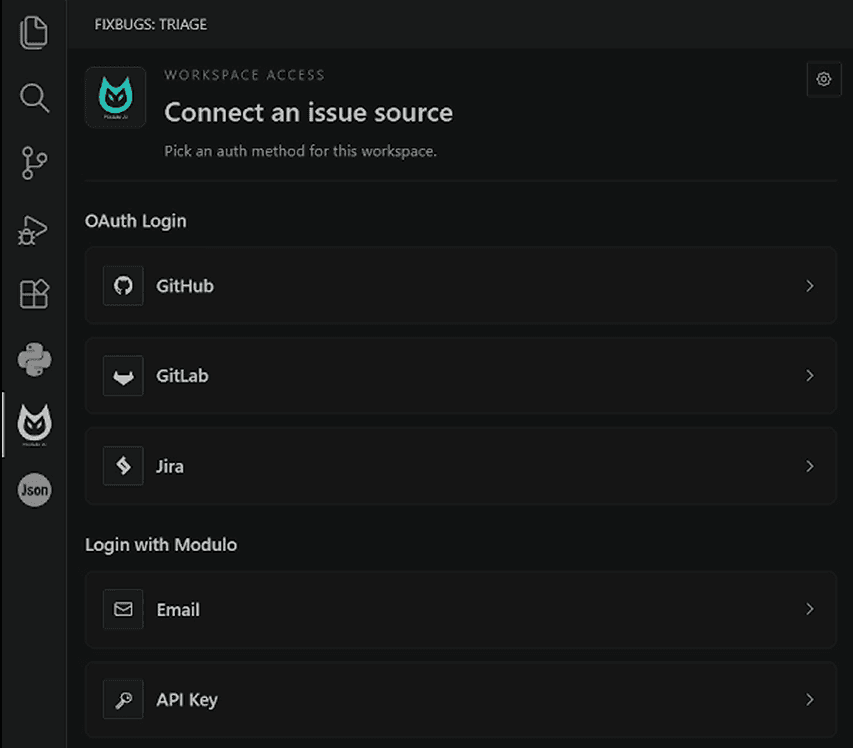
- Import bugs from GitHub, GitLab, Jira, APM alerts, or paste raw text
- Root-cause hypotheses with confidence scores and evidence
- Agentic streaming chat with full tool-call visibility
- Task-based fix plans with split-view source code
- Hunk-level diff review with inline accept / reject
- Apply fixes directly to your workspace; handle merge conflicts in-editor
- Create commits and open pull requests without leaving VS Code
Install: Open VS Code → Extensions → search FixBugs → Install, or use the Marketplace link.
What happens during a triage
1. Connect any issue source
2. Start the triage from a URL or pasted report
GitHub, GitLab, and Jira URLs are detected automatically. If the issue tracker does not encode which repository you want analyzed, you point FixBugs at one. The current workspace is the default.
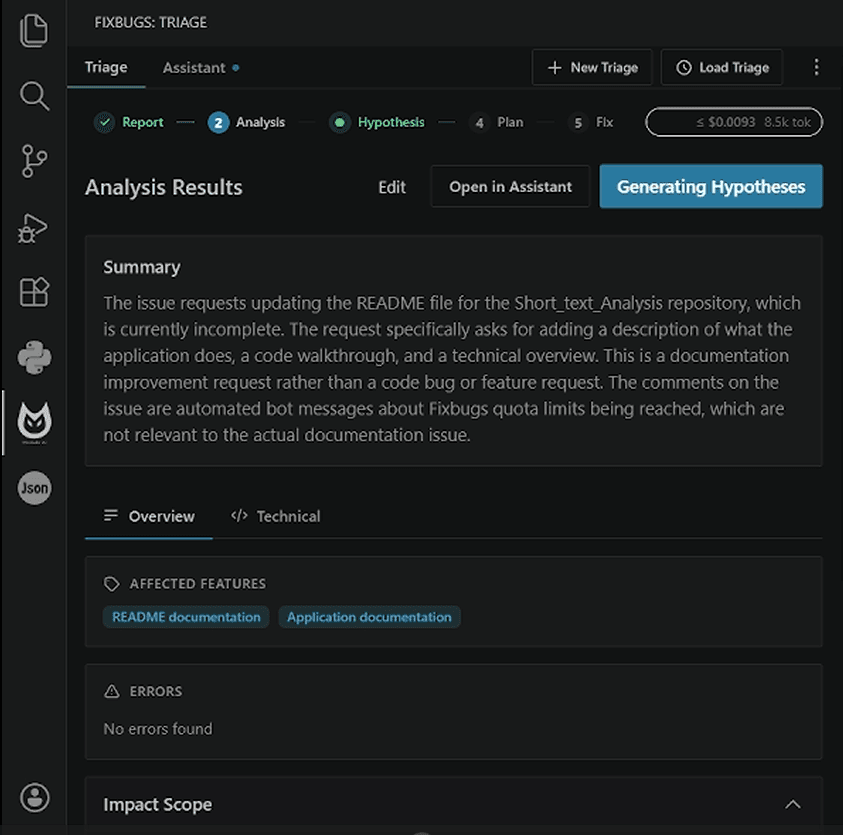
3. Get a structured analysis in under a minute
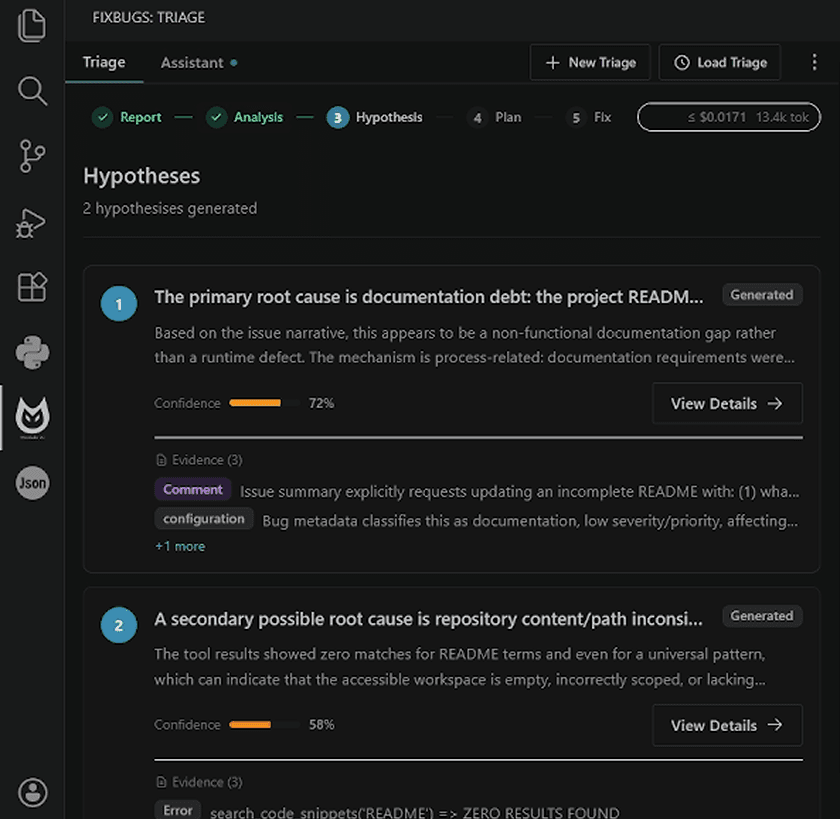
4. Compare ranked root-cause hypotheses
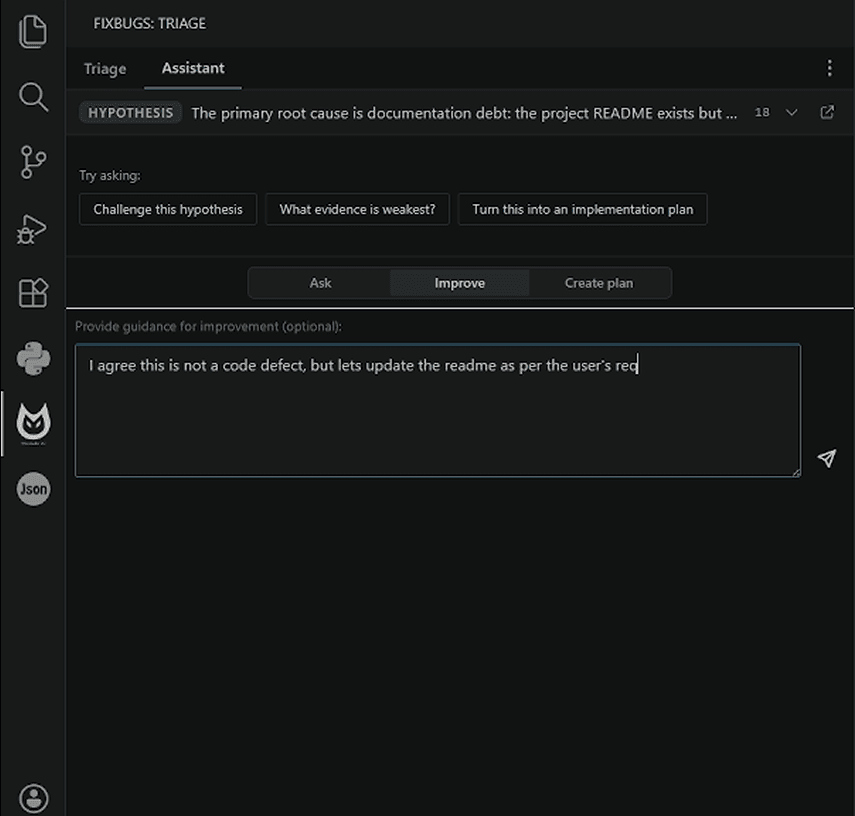
5. Push back, refine, or turn a hypothesis into a plan
6. Review the diff and open a pull request

Up and running in 3 minutes
- Install FixBugs from the VS Code Marketplace.
- Open the FixBugs panel from the activity bar and sign in.
- Paste any open issue URL, or click New Triage and paste a raw bug report.
- Wait under a minute for ranked hypotheses to appear.
- Pick a hypothesis, generate a fix plan, review the diff.
- Apply the patch or open a PR directly from the panel.
Try it on a real bug from your own backlog. The first three triages each month are free; full features, no credit card.
Features & Steps
Step 1 — Ingest & Analyze
Import a bug from any source:
- Paste a GitHub / GitLab / Jira issue URL
- Paste an APM alert URL or raw alert payload
- Type or paste a bug description directly
FixBugs fetches the full context: issue body, all comments, linked PRs, stack traces, error images, logs, metrics, and traces. No token ceiling — agent swarms chunkify and process arbitrarily large data volumes.
Step 2 — Hypotheses
Most debugging tools pick the single most likely cause and retry when wrong. FixBugs takes a different approach: recall over precision. It generates multiple competing root-cause hypotheses, each with:
- A confidence score (0–100%)
- Evidence pointers — specific files, functions, and line references
- A suggested fix approach
You review the hypotheses and select the one that fits your understanding.
Step 3 — Assistant Chat
A familiar streaming chat interface. Ask FixBugs anything about the bug, guide its reasoning, or ask it to reconsider a hypothesis. The agent shows its full reasoning chain:
- Real-time streaming text with extended thinking blocks
- Full functionality accessible via chat, from hypothesis tuning to regenerating the code changes.
Step 4 — Fix Planning
FixBugs generates a structured, task-based fix plan for the selected hypothesis. The plan view shows:
- A plain-language summary of the approach
- A list of tasks, each identifying the file to change and the change needed
- Split-view: plan on the left, live source code on the right
Edit the plan inline or ask FixBugs to regenerate with constraints (e.g., "make the fix more conservative", "avoid changing the public API").
Step 5 — Diff Review & Apply
FixBugs generates unified diffs for every affected file. Review them at the hunk level — accept or reject individual change blocks without touching the rest of the file. Regenerate any hunk inline with guidance.
When satisfied, apply the fix to your workspace:
- Clean workspace — changes appear as unsaved edits; review before saving
- Dirty workspace — a three-way merge UI shows original, current, and proposed side by side
From there, create a commit and open a pull request — all from the VS Code panel.
Configuration
All exposed user settings are under the modulo.fixbugs.* namespace in VS Code settings (Ctrl+, or Cmd+,). The extension intentionally exposes only the settings below.
Supported User Settings
| Setting | Default | Description |
|---|---|---|
modulo.fixbugs.serverMode | "local" | local starts and talks to the managed local fixbugs runtime. cloud uses the hosted FixBugs service instead. |
modulo.fixbugs.dataDirectory | "" | Base directory for managed runtime data such as config, logs, repos, and runtime state. Leave empty to use the platform default. |
modulo.fixbugs.llm.premiumModel | Managed default | Primary model for analysis, hypotheses, and fix generation. Users can select between frontier models from OpenAI, Anthropic, Gemini, Minimax AI, Z.AI, and other providers. The default may change as the model catalog evolves. |
modulo.fixbugs.llm.smallModel | Managed default | Fast model for simple tasks. Users can select between frontier models from OpenAI, Anthropic, Gemini, Minimax AI, Z.AI, and other providers. The default may change as the model catalog evolves. |
Runtime modes
local— the extension starts the bundledfixbugsruntime on your machine and talks to it over loopback.cloud— the extension does not start a local runtime and talks tohttps://cloud.fixbugs.aiandhttps://users.fixbugs.ai.
GitHub App
The FixBugs GitHub App (fixbugs-app) installs through GitHub Marketplace and integrates directly into your GitHub issue workflow. Install it once; FixBugs starts from the fixbugs label or valid issue comments, then responds with analysis summaries, code fixes, and pull requests.
Installation
- Visit the FixBugs GitHub App listing or search FixBugs in the GitHub Marketplace.
- Click Install and select repositories:
- All repositories — FixBugs monitors all current and future repos
- Select repositories — Choose specific repos
- Authorize the required GitHub permissions (see Webhook Configuration).
- Verify your email to activate the account.
Automatic Behavior
FixBugs does not start work just because a new issue is opened. Start the full fix workflow by applying the fixbugs label or by posting one of the issue comment commands below. On completion, FixBugs posts an AI-generated issue comment containing:
- Summary — concise description of the bug
- Classification — bug type (runtime error, API issue, logic bug, configuration error, etc.)
- Severity and priority — impact and urgency assessment
- Fix details — proposed changes, rationale, and next action
Webhook Commands
Post any of the following as an issue comment, or apply the matching opt-in label, to trigger the FixBugs fix pipeline.
| Command | Type | Description |
|---|---|---|
fixbugs <optional guidance> | Primary | Analyze the issue, generate hypotheses, and produce diffs without opening a PR |
fixbugs-pr <optional guidance> | Automation | Generate a fresh fix and open a pull request |
fixbugs-repro <optional guidance> | Testing | Generate or improve a runnable reproduction with setup, run steps, and reproduction code |
fixbugs-validate <optional FixBugs-generated PR URL> <optional guidance> | Validation | Validate the latest generated fix or a FixBugs-generated PR; external PR validation is refused for safety |
fixbugs-review <optional PR URL> <optional guidance> | Review | Run a multi-agent review of the latest fix or a same-repository PR |
fixbugs-address-review <optional PR URL> <optional guidance> | Refinement | Address review findings; FixBugs-generated PRs are updated, external PRs get a copy-paste patch |
You can also use short trigger phrases anywhere in a comment:
@fixbugs fix this
@fixbugs fix
@fixbugs focus on auth middleware
@fixbugs fixture failure
Typical Workflow
- Team member reports a bug in GitHub Issues
- Apply the
fixbugslabel or commentfixbugs - FixBugs analyzes, generates fix (5–10 min), posts diffs as a comment
- Comment:
fixbugs-pr - FixBugs opens a pull request with the fix
- Team reviews, approves, and merges
Iterative Refinement
If the first fix doesn't address the root cause, guide FixBugs with context:
The issue is in the authentication middleware, not the database layer.
The session token expires before the refresh logic runs.

@fixbugs please focus on the authentication middleware and token refresh flow
FixBugs reruns fresh analysis with your guidance as additional context.
Webhook Configuration
Configuration is done entirely through GitHub during installation — no server setup required.
Required GitHub Permissions
| Permission | Access | Purpose |
|---|---|---|
| Repository Contents | Read | Analyze source code |
| Issues | Read / Write | Read bug reports, post analysis and fix comments |
| Pull Requests | Read / Write | Create pull requests with generated fixes |
| Commits | Read | Review existing commits for context |
Trigger Events
| Event | Trigger | Action |
|---|---|---|
| Issue opened | None | Acknowledged; no workflow is started |
| Issue labeled | fixbugs | Full fix workflow spawned; fix comment posted on completion |
| Issue comment created | On command phrase | Full fix workflow spawned; fix comment posted on completion |
Security: All webhook payloads are verified via HMAC-SHA256 signature before processing. FixBugs never permanently stores your source code.
Pricing
- 3 bug fixes / month
- Discord community support
- 15 bug fixes / month
- Pay-as-you-go credits
- Email support
- 30 bug fixes / month
- Priority support
- Dedicated onboarding
- Custom bug fix volume
- Advanced access control
- Support SLAs
Save 25% on self-serve paid plans with annual billing. Pay-as-you-go: Pro plan users can purchase additional fix credits at API rates beyond the monthly quota. Enterprise agreements are quoted separately.
Modify your plan through your user portal on https://users.fixbugs.ai.
Other Tools
| Dimension | AI SRE Tools | Gemini / Codex | FixBugs |
|---|---|---|---|
| Category | Next-Gen Monitoring | Code Assistant | Triage and Fix — Alerts & Bugs |
| Primary Function | Monitoring + RCA | Code generation | Real-time RCA + Fix |
| Monitoring Integration | Yes | No | Yes |
| Context Handling | Large context | Limited context | Large context |
| Production Bug Handling | Automated triage | Manual input | Automated bugfixing |
| Fix Validation | No | Manual | Automated |
| Fix Generation | No | Yes | Yes |
Account Management
Manage your FixBugs account at users.fixbugs.ai.
Dashboard
- Quota monitoring — Visual progress bar showing usage vs. monthly quota; alerts at 80% and 100%; next reset date
- Usage statistics — Bugs Analyzed (all time), PRs Merged, API Calls this month
- Subscription badge — Current plan (Free Trial / Pro / Super User / Enterprise)
- GitHub Marketplace status — Plan name, billing cycle, next billing date, pending plan changes
API Keys
API keys authenticate the VS Code extension, CLI, and any programmatic access.
- Dashboard → API Keys → Create New API Key
- Give it a descriptive name (e.g., "VSCode Extension", "CI/CD Pipeline")
- Copy the key immediately — it is shown only once
- Store it in a password manager or environment variable; never commit to source control
Each key records its call count, last-used timestamp, and active/revoked status. Revocation via Dashboard → API Keys → Revoke is immediate and irreversible.
Billing Portal
Dashboard → Billing & Subscription:
- View and download invoices
- Update payment method
- View payment history
- Upgrade, downgrade, or cancel subscription
Upgrades take effect immediately. Downgrades apply at the end of the current billing period.
Privacy & Compliance
| Protection | Detail |
|---|---|
| Encryption at rest | AES-256 |
| Encryption in transit | TLS 1.2+ |
| Data export | JSON format, delivered by email within 24h — Settings → Privacy & Data Controls → Export Your Data |
| Account deletion | All data permanently deleted, all API keys revoked — Settings → Privacy & Data Controls → Delete Account |
| Standards | GDPR, CCPA, SOC 2, DPDP Act 2023 |